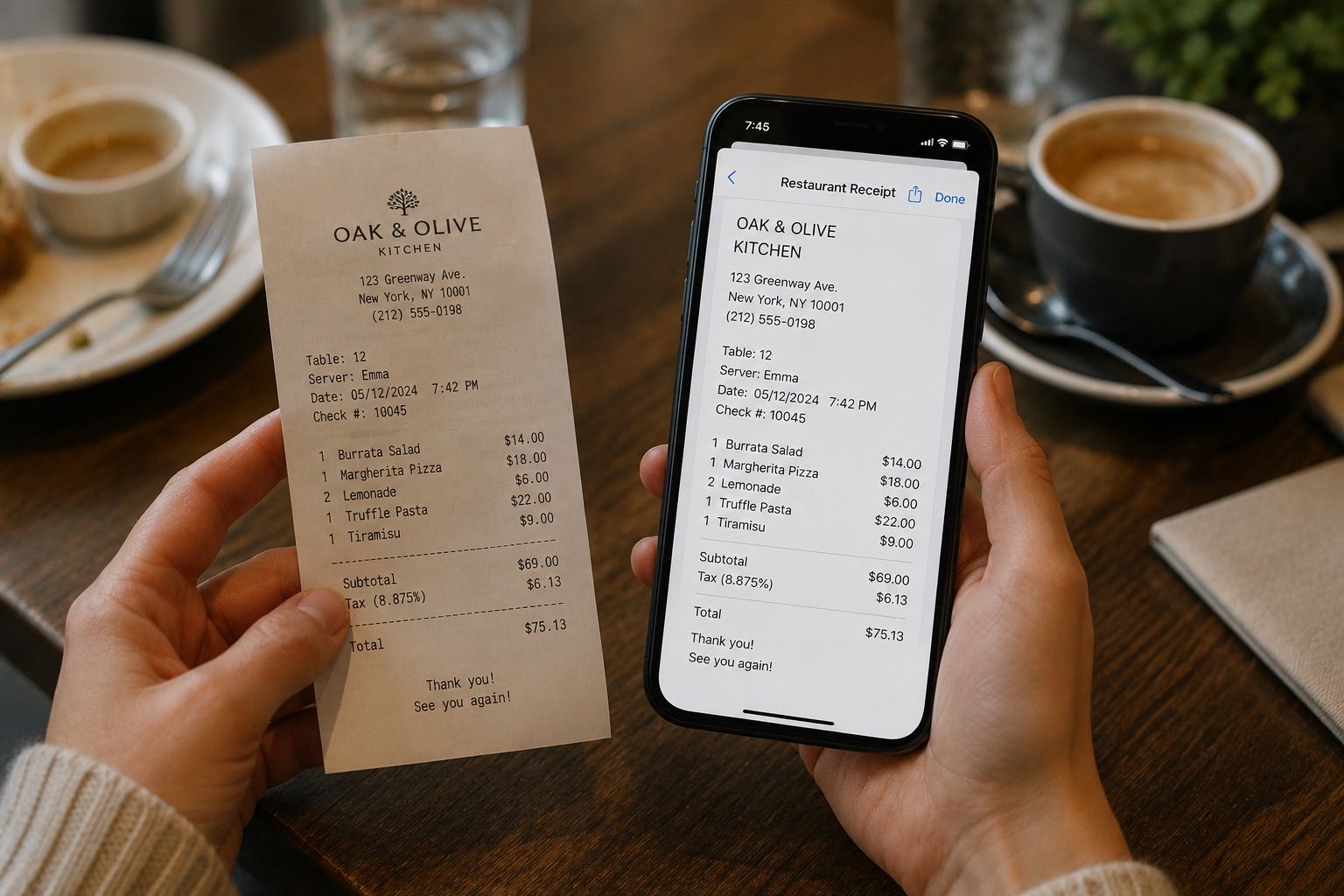
AI OCR combines optical character recognition with AI models that can do more than identify individual characters. Depending on the system, it can also analyze layout, connect labels with values, preserve tables, and use context to interpret a document.
That difference sounds fairly abstract until you run the same document through two different OCR systems.
I did exactly that with a simple invoice. Both tools could read most of the text. But one of them essentially gave me a sequence of words and numbers, while the other preserved much more of the original document structure.
And I think that difference is much more useful than simply saying that "AI made OCR better."
AI OCR in One Paragraph
Traditional OCR is primarily designed to detect characters in an image and convert them into machine-readable text.
AI-powered OCR can add another layer to that process. Instead of looking only at characters, modern models can also consider the surrounding context and the way information is arranged on the page.
That matters when the source isn't just a clean block of printed text.
Think invoices, tables, forms, handwritten notes, screenshots, multi-column pages, or photos taken at an angle.
In those cases, recognizing the words is only part of the job. The system may also need to understand which pieces of text belong together.
Is Tesseract Still Relevant?
I wanted to see that difference on an actual document, so I started with Tesseract.
Tesseract is one of the best-known open-source OCR engines, and it's still widely used. It runs locally, it's free, and for clean printed text it can be more than enough.
So rather than comparing two commercial tools, I used the same synthetic invoice with:
- Tesseract, as the traditional OCR baseline
- Chandra OCR 2, a modern document model I ran locally
The invoice contained four line items, a subtotal, tax, and a final amount.
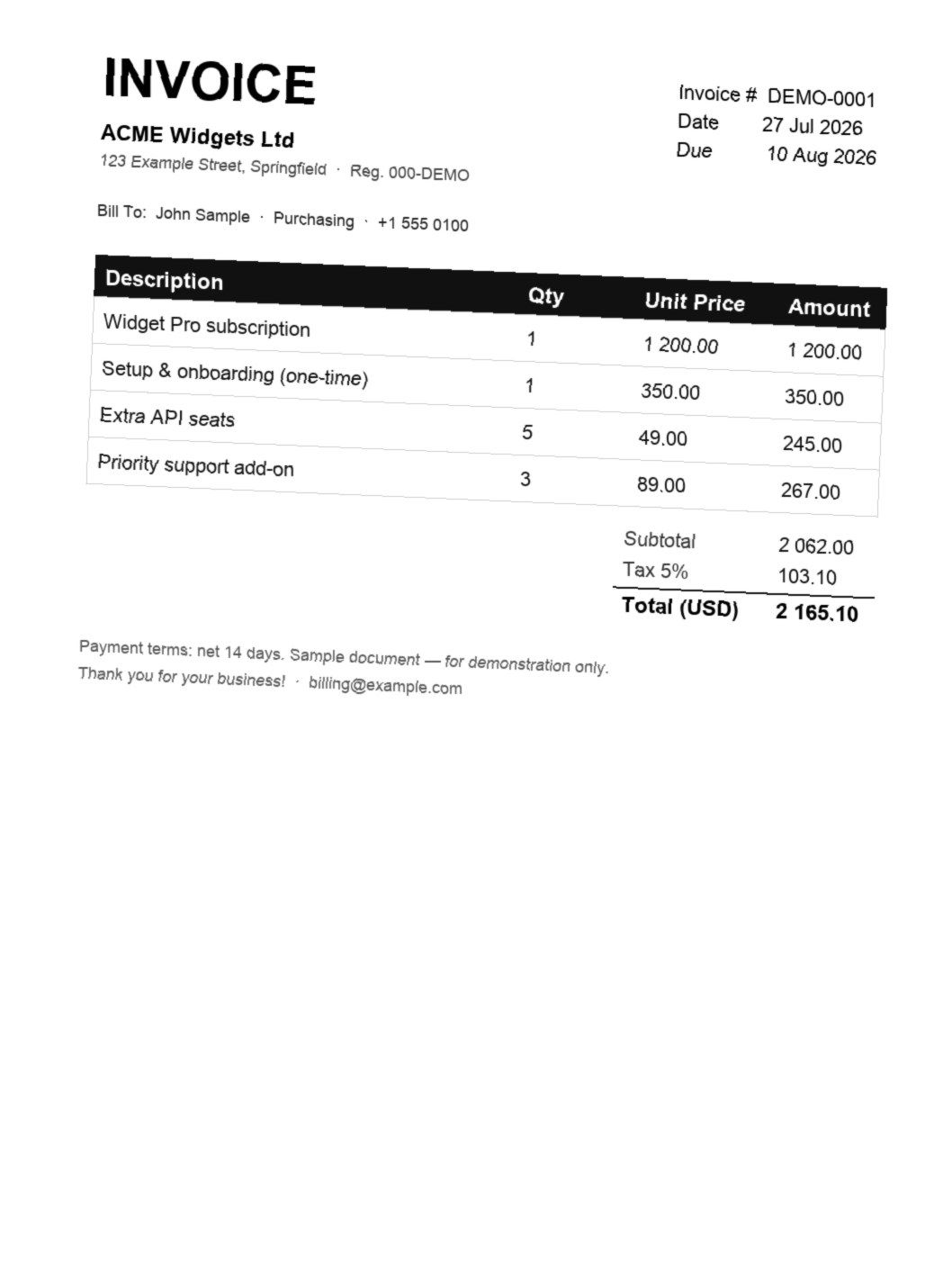
I also tilted the image slightly to make it look more like something you'd actually photograph with a phone.
Then I sent exactly the same file through both systems.
Tesseract vs. AI OCR: What Actually Changed?
At first glance, Tesseract did pretty well.
It correctly recognized the important totals: 2,062.00 for the subtotal, 103.10 for tax, and 2,165.10 for the final amount.
But there were several text errors:
INVOICEbecameINVOICE AYSpringfieldbecameSpringfieiaExtra API seatsbecameExtra AP seats
Three errors across an entire document aren't necessarily a disaster.
What I found much more interesting was what happened to the table.
The original invoice had four columns: Description, Qty, Unit Price, and Amount. In the Tesseract output, most of that structure disappeared. The values became a sequence of text and numbers, and it was much harder to tell which price belonged to which line item.
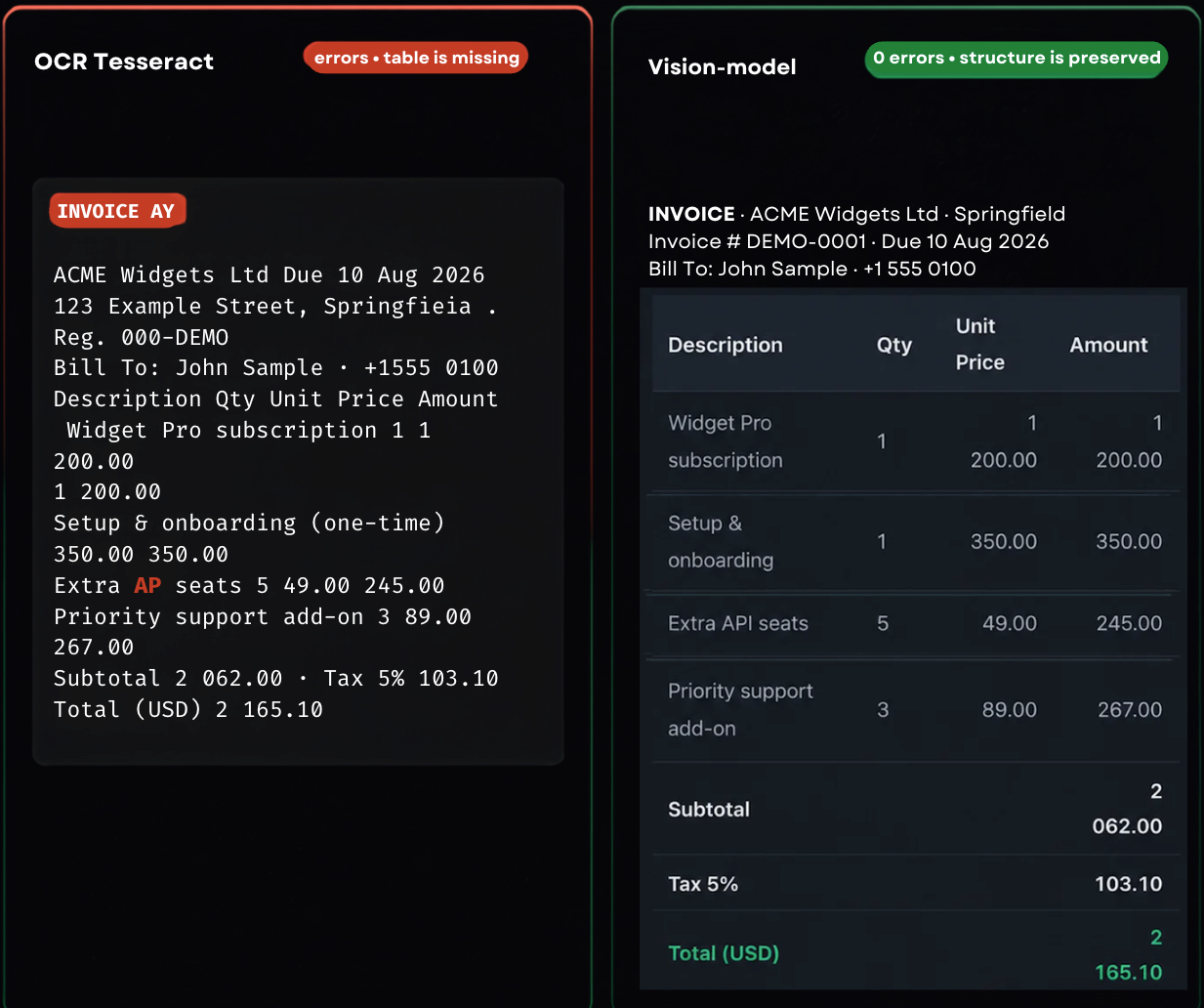
Chandra OCR 2 handled the same document differently.
The model preserved the relationship between rows and columns much more clearly and reconstructed the table closer to the original.
That was the point where the difference between traditional OCR and newer AI OCR became much more concrete for me.
Both systems could "read" the document.
But they didn't understand the document in the same way.
Both engines recognized nearly the same characters. The difference showed up in what survived around them — the rows, the columns, and the link between a value and its field.
Traditional OCR vs. AI OCR
I wouldn't draw an absolute line between "old OCR" and "AI OCR." Modern OCR systems often combine several techniques, so the categories overlap.
But as a practical simplification, I think the difference looks roughly like this:
| Traditional OCR | AI-powered OCR | |
|---|---|---|
| Clean printed text | Usually very good | Usually very good |
| Tables | May lose rows and columns | Better at preserving structure |
| Photos taken at an angle | Accuracy may drop | Often more robust |
| Complex layouts | May mix separate blocks | Better at relating page elements |
| Handwriting | Depends heavily on the engine | Modern models can perform much better |
| Document context | Limited | Can use surrounding context |
| Compute requirements | Usually lighter | Can require more compute |
| Predictability | More deterministic | Can occasionally infer something incorrectly |
That last row is important.
AI OCR doesn't simply remove all the old OCR problems. It introduces some new tradeoffs too.
Three Generations: Traditional, AI and GenAI OCR
While looking into this, I found it useful to think about OCR as three broad generations rather than two.
The boundaries aren't perfect, but they make the current landscape much easier to understand.
Traditional OCR
This is the classic approach.
The system detects text regions and characters and converts them into machine-readable text.
For clean scans, printed books, simple documents, and other predictable inputs, this can still work extremely well.
Tesseract is probably the most familiar example.
Specialized AI OCR
The next step is OCR systems trained specifically on more difficult recognition tasks.
They can be much better at handwriting, distorted text, unusual fonts, document layouts, or particular types of forms.
They are still OCR systems, but machine learning plays a much bigger role in how the text is detected and interpreted.
Vision Models and GenAI OCR
Vision-language models, or VLMs, take the idea further.
Instead of treating the page only as a collection of characters, they can analyze the image and the text together.
That makes it possible to ask questions that go beyond "what characters are in this image?"
The model can also reason about which number belongs to a given field, whether a block is a table, which text is the heading, and which values belong to the same row.
This is especially useful for documents where layout is part of the information.
How AI OCR Works, Step by Step
The exact pipeline depends on the tool, but conceptually modern AI OCR often involves several stages.
- The image is prepared. The system may correct rotation, reduce noise, improve contrast, or otherwise prepare the image for recognition.
- Text and layout regions are detected. Instead of immediately reading every character, the system identifies where text, tables, blocks, or other elements are located.
- The text is recognized. This is the part most people associate with OCR: turning pixels into characters and words.
- Structure and context are analyzed. A system may recognize that four values belong to the same table row, or that a number next to "Total" is the final amount rather than an unrelated number elsewhere on the page.
- The result is reconstructed. Finally, the recognized information is returned as plain text, structured data, Markdown, JSON, or another output format.
Not every AI OCR tool does all five stages in exactly this way, but it explains why two systems can recognize almost the same words and still produce very different outputs.
If you'd rather skip the pipeline entirely, ImgTxtApp, a Telegram bot for extracting text from images, handles these stages behind a single workflow.
Can ChatGPT Do OCR?
Yes, ChatGPT can extract and interpret text from images when the model you're using supports image input.
And this is actually a useful example of why the line between OCR and vision models has become less clear.
With a traditional OCR engine, the primary goal is usually image → text.
With a multimodal model, you can also ask it to interpret what it sees.
For example, instead of only extracting an invoice, you can ask it to identify the total, explain the table, organize the line items, or return the information in a particular format.
That flexibility is useful, but it comes with an important tradeoff.
A generative model can sometimes infer what unclear text probably says rather than simply reporting that it couldn't read it.
For casual screenshots or notes, that may not matter much. For financial values, dates, document numbers, or other critical information, I would still verify the result against the original.
Where AI OCR Still Fails
It's easy to look at modern vision models and assume OCR is basically solved now.
In practice, there are still plenty of cases where things go wrong.
Difficult Handwriting
Modern models can handle handwriting surprisingly well, but messy handwriting is still messy handwriting.
If letters overlap, the writer uses unusual abbreviations, or the text is difficult for a human to decipher, the model can make mistakes too. I tested this separately on real handwritten pages in How to Convert Handwriting to Text from a Photo.
Very Low-Resolution Images
Context can help a model interpret ambiguous text, but it can't reliably recover information that simply isn't present in the image.
If a tiny character has been reduced to a few blurry pixels, there may not be enough visual information left to identify it correctly.
Complex Layouts
Multi-column pages, nested tables, annotations, footnotes, and unusual document layouts can still cause elements to be connected incorrectly.
Important Numbers
This is one area where I would always be careful.
A single wrong character in a book quote might be annoying. A single wrong digit in an invoice total, account number, date, or document ID can be much more serious.
Hallucinations
This is a limitation that matters specifically with generative vision models.
Traditional OCR will often misread or omit a character when it isn't sure.
A generative model may sometimes produce a plausible value instead.
That can make the output look cleaner while actually making the error harder to notice.
Speed, Cost, and Compute
A more sophisticated model isn't automatically the best choice.
If you're processing thousands of clean scans, a lightweight OCR engine can be faster, cheaper, and easier to run locally.
Which brings me back to Tesseract.
AI OCR removes some old failure modes and adds a new one: an output that looks clean because the model filled in a value it could not actually read.
When Traditional OCR Is Still the Better Option
After my invoice test, it would be easy to conclude that Tesseract is simply outdated.
I don't think that's true.
If I had a large collection of clean scanned pages and only needed the text, I would absolutely consider traditional OCR.
It's mature, predictable, inexpensive to run, and can work completely locally.
AI OCR becomes more interesting when the document itself is harder:
- tables
- forms
- handwriting
- photographs rather than scans
- unusual layouts
- documents where the relationship between elements matters
So for me, the real question is: what information do I need to preserve from this particular document?
What About Vision Models and Document VLMs?
This is where OCR starts overlapping with a much broader category of models.
A vision-language model (VLM) works with visual and textual information together. When these models are designed or adapted for documents, they can interpret not only the text but also the structure and relationships on the page.
You may see terms such as Document VLM, vision models for OCR, or vision-language document parsing used around this area.
I wouldn't worry too much about the terminology unless you're choosing a model or building your own OCR pipeline.
From a practical point of view, the important shift is this: the system isn't only trying to read the page anymore. It's also trying to understand how the page is organized.
That's exactly what I saw in the invoice test.
OCR Models You Can Run Locally
Another thing I find interesting about the current OCR landscape is that cloud APIs aren't the only option.
There are now plenty of OCR and vision models that can be run locally, depending on your hardware and what you're trying to process.
The categories are quite different: traditional engines such as Tesseract, specialized OCR models, open-source vision models, and document-focused VLMs.
| Model | Best suited for |
|---|---|
| Chandra OCR 2 | Tables, forms, handwriting, formulas |
| PaddleOCR VL | Tables, forms, multilingual documents |
| dots.ocr | Structured documents, low-resource languages |
| DeepSeek OCR | Low-quality and rotated images |
| Nanonets OCR2 | Forms, signatures, stamps, checkboxes |
| LightOnOCR 1B | Simple documents |
| Granite Docling | PDFs, DOCX files, images |
| Surya 2 | Tables, layouts, multi-page documents |
| GOT OCR 2.0 | Text, formulas, sheet music, selected regions |
| LIFT | Field extraction, JSON output |
| Qwen3 VL | General-purpose documents and image understanding |
Running locally can make sense if privacy matters, if you're processing a lot of documents, or if you simply want more control over the pipeline.
But there is a tradeoff.
The more capable vision models can require significantly more memory and compute than traditional OCR. Setup is also much less "install it and forget it."
So I wouldn't choose a local VLM just because it's newer.
For clean text extraction, that can be a lot of machinery for a problem Tesseract already solves perfectly well.
So Which AI OCR Is Best?
After testing different approaches, I don't think there is a useful answer to this without first asking: best for what?
For a clean book scan, I'd care about character accuracy and speed.
For an invoice, I'd care about rows, columns, and numerical accuracy.
For handwritten notes, I'd care about handwriting recognition.
For a screenshot, I might care more about how quickly I can get the image into the tool and the text back out.
For several pages, I'd want to know whether they can be processed together.
So I'd think about the choice like this:
| What you're processing | What matters most |
|---|---|
| Clean printed page | Accuracy and speed |
| Screenshot | Fast input and easy text output |
| Invoice or receipt | Numbers and document structure |
| Table | Rows, columns, and relationships |
| Handwritten note | Handwriting recognition |
| Multiple pages/images | Batch processing |
| Sensitive document | Local processing and privacy |
| Poor-quality photo | Robustness to blur, angle, and noise |
The model matters.
But the workflow around the model matters too.
What This Means If You Just Need Text from a Photo
Most people probably don't want to choose between traditional OCR, specialized OCR, a vision model, and a Document VLM every time they have a screenshot.
And they shouldn't have to.
If I just need the text from an image, I care much more about the whole path: image → recognition → editable text. That path is exactly what I walked through in How to Copy Text from an Image on Android and iPhone, without any of the model choices above coming into it.
For example, if I have several screenshots or photos on my phone, I don't want to upload them one by one into different OCR interfaces.
I want to send them somewhere and get the text back.
That's one of the reasons I built ImgTxtApp by LaVioLab.
It works inside Telegram: I can send a screenshot, photo, scanned page, or several images and get the extracted text back in the chat.
The model stays under the hood. From the user's side, it's simply an image-to-text workflow.
What I Took Away from This Test
I started with a fairly simple question: why does one OCR system handle the same document better than another?
But after comparing the results, I think the more useful question is slightly different.
Recognizing individual characters is no longer the hardest part in many everyday documents.
The real differences start showing up when the document has structure.
Does the table remain a table? Does a value stay connected to the right field? Can the system handle a photo taken at an angle? Can it read handwriting? Does it process several pages together? And how much can you trust the output without checking the original?
That's why I wouldn't choose an OCR tool simply because it says "AI-powered."
I'd choose it based on what kind of document I'm working with, what information needs to survive the conversion, and what I need to do with the text afterward.
And if the only thing I need is to get editable text from screenshots or photos without thinking about the model underneath, that's exactly the problem I built my Telegram bot for.
ImgTxtApp by LaVioLab lets you send images directly in Telegram and get editable text back.